

What if the safety video employees remember is the one that mirrors decisions they face on the job? Learning how to create engaging safety training videos starts with that shift: move beyond generic rules and show people what a real risk looks like in their workplace, what action to take, and what could happen next.
Training can feel disconnected from daily tasks when a critical procedure is hard to explain on screen. A polished video alone won’t fix that. The content needs a clear learning objective, realistic scenarios, and memorable cues employees can use when it counts.
This guide shows you how to turn workplace risks into focused, easy-to-follow video training. You’ll learn how to build the message around employees’ actual tasks, choose between live-action, animation, or AI-assisted video, and assess whether people understand and apply what they’ve learned. From the first script to the final edit, thoughtful planning and production can make complex procedures clearer and more relevant without losing sight of the decisions employees need to make.
Key Takeaways
- Learn how to create engaging safety training videos by starting with a real workplace task, hazard, or procedure instead of generic messaging.
- Turn a single risk into a focused lesson with a clear objective, a realistic decision point, and a memorable recap.
- Compare live-action, animation, and AI-assisted presentation to match the format to your equipment, visuals, audience, and revision needs.
- Build a production and review workflow that keeps visuals, narration, captions, and on-screen instructions consistent.
- See how custom pre-production, filming, editing, and motion design can shape training content around its audience and learning objective.
Why Engaging Safety Training Videos Need to Reflect Real Work
A safety video earns attention when employees recognize their own work in it. A broad reminder to “stay alert” may sound relevant, but it doesn’t show what to notice while inspecting a machine, moving materials, or completing a task in a particular work area. To understand how to create engaging safety training videos, start with the moment when an employee must make a real decision, not with a generic message.
Choose one task, hazard, or procedure as the anchor. Then establish the context: who performs the task, where it happens, what could make it confusing, and which step requires care. A warehouse worker and a maintenance technician may face different risks and use different equipment. Their training examples should reflect those differences rather than asking one general video to speak to every role.
Engagement isn’t entertainment for its own sake. Dramatic music, fast edits, or visual effects only help when they direct attention to the learning objective. Realistic examples, clear visuals, and a deliberate pause at a decision point help viewers follow what’s happening and consider the next action. Broader context on the purpose of Safety Training can also help frame why instruction should connect to workers’ actual tasks.
How does relevance make safety training more engaging?
Build examples from the work environment and the questions employees actually raise. Frontline observations can reveal where a procedure feels unclear, which details are easy to miss, and what changes from one work area to another. Keep the approved procedure at the center. Show essential steps clearly, and trim background details that don’t help viewers understand the task or make the relevant decision.
What should a safety training video help employees do?
Give each video one clear learning objective. Define what viewers should recognize or do after watching, such as identifying a condition that requires them to pause and follow the established procedure. Avoid loading one short lesson with several unrelated topics. A single objective gives the script, visuals, and narration a shared focus.
An engaging safety training video is focused instruction that holds attention by helping employees recognize and act on a specific workplace decision.
Use that definition as a creative filter. Ask whether each scene clarifies the task, makes the relevant hazard visible, or reinforces the correct action. If a visual or line of narration doesn’t support the objective, cut or reshape it. That discipline helps the video stay memorable for the right reason: it reflects the choices employees need to understand on the job.
How to Turn a Workplace Risk into a Clear Video Lesson
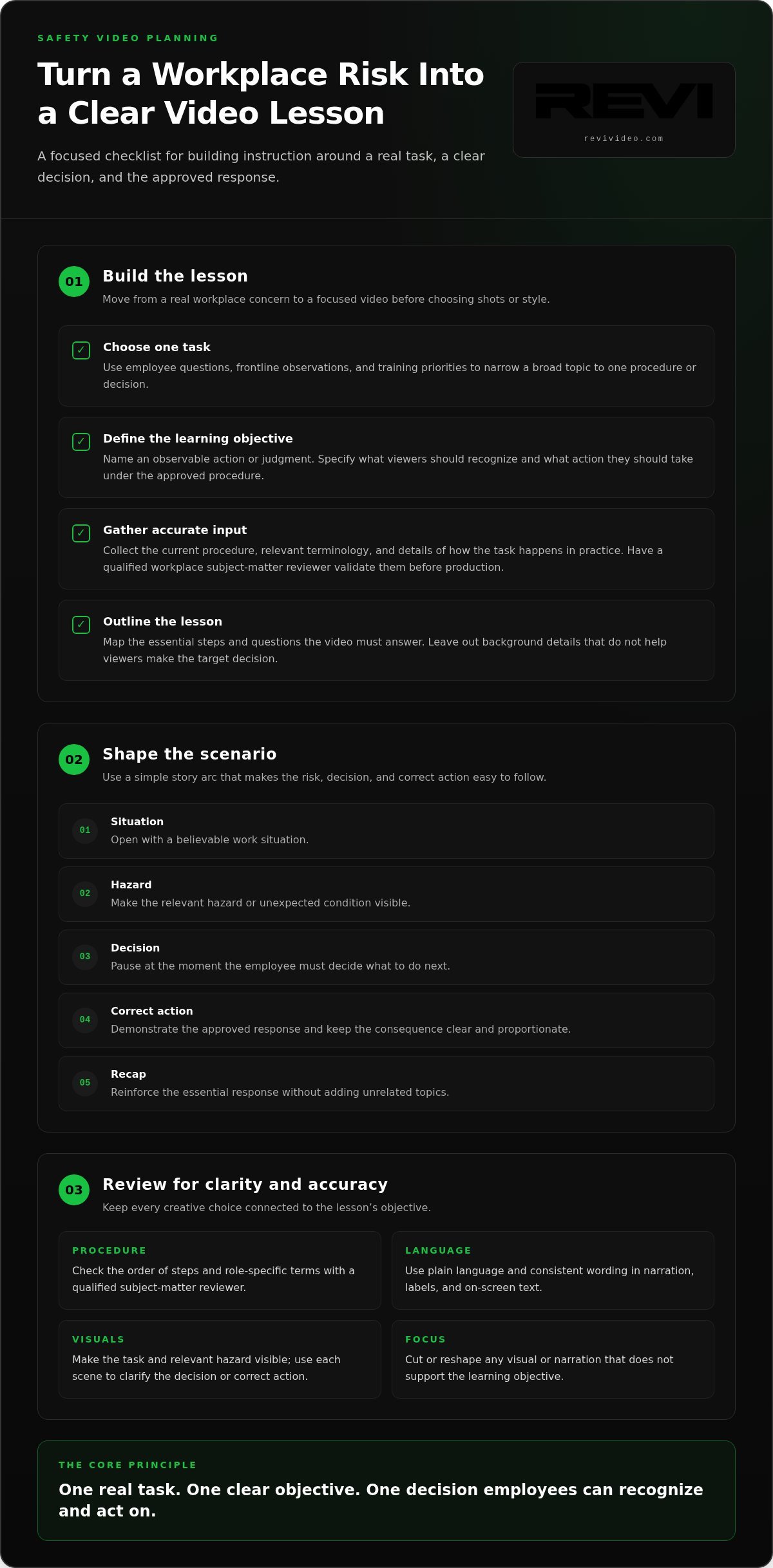
Move from a real concern to a focused lesson before planning shots or choosing a video style. A practical workflow connects the task employees need to perform with the decision the video should clarify. This keeps the script focused and gives reviewers a clear way to judge whether each scene belongs.
- Choose one task. Gather employee questions, frontline observations, and relevant training priorities. Narrow a broad topic such as equipment safety to one procedure or decision employees need to understand.
- Define the learning objective. Describe an observable action or judgment. For example, viewers should be able to identify the point in a specified process when they need to pause and follow the established procedure.
- Gather accurate input. Collect the current procedure, relevant terminology, and details about how the task happens in practice. Ask a qualified workplace subject-matter reviewer to validate those details before production.
- Outline the lesson. Map the essential steps and the questions the video must answer. Separate necessary instructions from background information that won’t help viewers make the target decision.
How do you choose a topic and learning objective?
Look for patterns in employee questions and observed confusion, then choose a training priority that fits a single video. A useful objective names something a viewer can demonstrate or recognize, not a vague goal like “understand safety.” For instance, specify the condition employees should recognize and the action they should take according to the approved procedure. That gives the script a clear target.
How should a safety training video script use scenarios?
Open with a believable work situation, reveal the relevant hazard, and pause at the decision point. Show the correct action and its practical consequence without dramatizing injury. Before filming, have a qualified subject-matter reviewer compare the script with actual practice, including the order of steps and any role-specific terms. OSHA’s OSHA Training Requirements and Resources can help teams locate relevant training information as they develop their lesson.
Use a simple story arc: situation, hazard, decision, correct action, recap. For example, a worker notices an unexpected condition while preparing for a task. Make that detail visible, pause to ask what the worker should do next, then demonstrate the approved response. Keep the consequence clear and proportionate. The goal is to help viewers follow the reasoning, not to shock them.
Write narration and on-screen text in plain language. Define specialist terms the first time they appear, and use the same wording across the script, labels, and narration. If a procedure requires precise language, preserve its meaning while explaining unfamiliar terms. A custom script and storyboard can bring that learning sequence into focus; custom video production can support the move from a clear outline to a finished lesson.
Filmed, Animated, or AI-Assisted: Which Safety Video Format Fits?
The best format depends on what employees need to see or understand. If the learning objective relies on a real machine, workspace, or sequence of hands-on actions, filmed footage can show those details directly. If the lesson explains an invisible process or highlights a small step, animation or motion design can make it easier to follow. AI-assisted presentation may suit repeatable information, provided a knowledgeable reviewer checks every detail.
Use this comparison to match the production approach to the instruction, not to the latest trend.
| Format | Best fit | Revision and complexity considerations |
|---|---|---|
| Live-action filming | Authentic equipment, locations, and actions that depend on workplace context | Location access and coordinated demonstrations shape production; changes to a procedure may require new footage. |
| Animation or motion design | Abstract processes, sequences, or details that need visual emphasis | Visuals can be adjusted without reshooting, though complex scenes require thoughtful design and review. |
| AI-assisted presentation | Repeatable narration or straightforward information that doesn’t depend on showing authentic work | Presentation elements may be easier to revise, but generated visuals and spoken details need careful human review. |
When is filmed safety training footage the stronger choice?
Choose filming when the real environment materially affects understanding. Show the relevant equipment, controls, labels, or work area as employees encounter them. Plan each shot around the procedure: keep hands, tools, and important steps visible, and avoid camera angles that hide what viewers need to notice. A knowledgeable workplace reviewer should validate the depicted work before final editing so the finished video reflects the intended practice.
Live-action footage can also make role and location differences clear. If a task varies across teams or settings, plan shots that show the relevant context rather than implying one demonstration covers every situation. Keep the camera focused on the action that supports the lesson.
When can animation or AI-assisted video help?
Animation can clarify a sequence that’s difficult to film directly. Motion design can guide attention to a component, show how parts relate, or make an abstract process visible. These tools work best when they simplify the explanation without changing the meaning of the procedure. Keep labels and visual cues consistent with the approved instructions.
AI-assisted presentation can help deliver repeatable narration or straightforward material, but it shouldn’t replace content review. Check that the wording is accurate and that any generated visual represents the procedure correctly. For a lesson that depends on authentic equipment or precise physical actions, use real footage or carefully designed animation to show what matters. A hybrid approach can pair filmed demonstrations with motion graphics for added clarity.
That’s the practical rule for how to create engaging safety training videos: choose the format that makes the learning objective easiest to see, follow, and review. Novelty is optional. Clarity isn’t.
How to Produce, Review, and Evaluate a Safety Training Video
A strong lesson needs a production workflow and a feedback loop. Treat the video as a working training resource: develop it, check it against the intended procedure, then use learner responses to guide revisions. That discipline helps keep the finished piece clear and useful without assuming the video alone will change workplace outcomes.
- Brief the project. Record the intended audience, learning objective, delivery context, and source procedure. Identify who will review the technical details.
- Script and plan. Shape the lesson into scenes, narration, on-screen text, and supporting visuals. Decide whether filming, animation, or a combination best communicates each step.
- Produce the content. Film the planned demonstration or create the animated visuals. Keep each shot and graphic tied to the objective.
- Edit for clarity. Refine pacing, sound, captions, and graphics. Remove details that distract from the procedure.
- Review before release. Ask workplace subject-matter reviewers to check the depicted steps and terminology. Resolve conflicting or unclear instructions before publishing.
- Release and evaluate. Pair completion information with a knowledge check and learner feedback. Observe relevant work practices where appropriate.
- Revise with evidence. Use recurring questions or missed concepts to identify moments that need clearer narration, visuals, or pacing. Keep a record of revisions and the reason for each change.
What should reviewers check before a training video goes live?
Review the video as both a procedure and a viewing experience. Confirm that the actions shown match workplace practice, and that narration, captions, labels, and on-screen text describe the same steps. Check that text is readable, speech is clear, captions are accurate, and pacing gives viewers time to follow important details. Verify regulatory statements against current authoritative sources before including them.
One practical review method is to compare the approved procedure with the final video scene by scene. If a shot could imply a different action than the narration, revise it. Polished editing can’t resolve conflicting instructions.
How can you tell whether the video is working?
Completion data tells you whether viewers reached the end, not whether they understood the lesson. Pair it with a short knowledge check tied to the objective, plus feedback that asks which step felt unclear. If viewers repeatedly miss the same point, inspect that moment in the script and edit. The issue may be the wording, visual emphasis, or pace.
Where relevant, compare observations of the targeted work practice over time. Note other changes that may affect those observations, and don’t attribute a shift to the video alone. This creates a practical improvement loop: review what learners understood, identify friction, and refine the next version. If you’re ready to shape a training video from brief through edit, explore custom video production.
How REVI Can Bring a Custom Safety Training Video to Life
Knowing how to create engaging safety training videos is one part of the job. Turning a specific learning objective into clear, well-crafted video takes coordinated planning and production. REVI brings together Pre-Production, Production, and Post-Production to shape custom video content around its intended audience and purpose, while workplace subject-matter reviewers provide and validate the procedure itself.
What does a custom video production partnership contribute?
Pre-Production starts with discovery. These sessions shape a creative brief around who will watch the video, what they need to understand, and where they’ll use it. Storyboarding maps the instruction visually before filming begins. Scripting gives narration and on-screen text a consistent direction, while location planning organizes production around the work environment when real settings matter.
That preparation makes production choices more purposeful. Plan a shot to show a step clearly; design a graphic to direct attention to a relevant detail. The workplace team remains responsible for confirming that the procedure and depicted actions are accurate. Clear roles keep creative execution and technical review aligned without confusing one for the other.
During Production, planned footage and other visual elements come together. In Post-Production, editing shapes the pace and sequence, while motion design can clarify information that benefits from visual emphasis. Sound engineering and audio mastering support clear narration, and color grading helps create a consistent finished look. Each choice should serve the instruction, not distract from it.
How can one training video support a wider content strategy?
Start with the core lesson, then consider whether any portion serves a distinct learning moment or delivery need on its own. A short-form cut might isolate one clearly defined concept, while the main video provides the fuller explanation. Keep each version accurate and understandable in context rather than trimming away details employees need to follow the procedure.
Distribution matters, too. If the project calls for a dedicated web destination, REVI builds high-performance, conversion-focused websites with custom UX and responsive design. A web experience can give employees a clear place to access the training content, with the site structure shaped around the project’s needs.
Custom production connects the learning objective to the script, visuals, sound, and final edits in one coordinated creative process. That gives your team a clear path from brief to finished training content, while leaving procedure accuracy with the people qualified to review it.
Explore REVI’s video production services to shape a custom project around your training audience and objective.
Turn Your Training Objective into a Video Plan
The next step is to choose one workplace decision worth making clearer and shape a video project around it. Define who needs the instruction, what the video should help them recognize, and how your team will review whether the message lands. That focus gives every creative choice a purpose, from the opening scene to the final edit.
If you’re exploring how to create engaging safety training videos, a custom production partner can help move the idea from objective to finished content. REVI brings together data-backed Creative Strategy, project-specific planning, and end-to-end Pre-Production, Production, and Post-Production to support the creative process.
For businesses in Phoenix, Scottsdale, Gilbert, Mesa, Chandler, Paradise Valley, and Tempe, REVI can help turn a clear training objective into custom video content. Explore REVI’s custom video production capabilities and start planning a focused, clear training video for your audience.
Frequently Asked Questions
How do you make safety training videos engaging for employees?
Make the lesson recognizable and give viewers a reason to pay attention. For example, show a worker deciding what to do when a tool or work area differs from what they expected, then explain the appropriate next step. To learn how to create engaging safety training videos, ask employees which parts of the task cause hesitation or repeated questions. Use their feedback to make the video more relevant, not more dramatic.
What should a safety training video include?
Include the intended audience, the task or situation, the approved instructions, and a clear explanation of the actions viewers should take. Add narration or labels where they help clarify what the viewer sees, and provide captions so spoken information is available as text. For a maintenance procedure, for instance, a brief checklist on screen can reinforce the sequence shown without crowding the frame or introducing steps that aren’t part of the approved process.
How long should a safety training video be?
There isn’t one ideal runtime for every safety topic. Keep a video as short as it can be while still explaining the procedure accurately and clearly. A simple reminder may work as a brief module; a task with multiple stages may need more time or several focused videos. Review the script for repeated explanations and side topics. If viewers need to replay sections to follow the sequence, improve the structure before simply cutting more content.
Can a safety training video replace in-person training?
Not as a blanket rule. A video can explain concepts, show a procedure, or prepare employees for a discussion, but some training objectives may call for a live demonstration, questions, or hands-on practice. OSHA training requirements vary by hazard and task, so employers should match the training approach to the applicable requirement and employees’ needs. Use video as one part of the learning plan when it supports the instruction, not as an automatic substitute.
Is live-action or animation better for safety training videos?
Choose based on what learners need to see. Live-action footage can show the actual layout of a work area or how a tool is handled. Animation can make a sequence, internal process, or small detail easier to explain visually. A hybrid video can combine real footage with simple graphics. For teams in Phoenix, Scottsdale, Gilbert, Mesa, Chandler, Paradise Valley, or Tempe, relevant local settings can help reflect the environment employees recognize.
How do you measure whether a safety training video is effective?
Use more than views or completion rates. Add a few questions that test the specific knowledge the video teaches, then ask viewers which part was unclear or difficult to apply. If the lesson concerns a recurring task, supervisors can also observe whether employees follow the relevant steps during work. Track these signals over time and consider other changes in the workplace before drawing conclusions about what caused any improvement or gap.
Can AI be used to create workplace safety training videos?
Yes, AI-assisted tools can help create or revise presentations, narration, and other repeatable content. Treat their output as a draft, not an authority on workplace procedures. Have a qualified reviewer check every instruction, visual, label, and spoken detail against current practice before employees see it. AI may suit a straightforward informational module, while authentic equipment demonstrations or precise physical actions may call for filmed footage or carefully designed animation.