

One video series can serve more than one specialty. A patient education video series for hospitals in Chandler can organize clear, specialty-specific explanations for hospital websites and exam rooms. For example, an infant CPR video covers newborns through age 1, while a child CPR video covers children from age 1 through puberty.
Patients need practical information that reflects the care they’re receiving. A patient education video series for hospitals in Chandler can organize specialty-specific topics, from preparing for a procedure to understanding diabetes emergencies such as severe hypoglycemia and diabetic ketoacidosis. With focused scripts, consistent visual design, and thoughtful placement, hospitals can make each video easier to use online or during in-person education.
Key Takeaways
- Plan each video around a specialty’s distinct patient education needs, then organize the series so viewers can find relevant topics easily.
- Adapt video presentation for the viewing context: a hospital website supports advance or follow-up viewing, while an exam room can reinforce in-person explanations.
- Learn what to look for when exploring patient education video access through Chandler hospitals, including how availability may differ by facility and topic.
- See how professional video production can turn medical topics into a cohesive series designed for digital and in-person use.
Patient education videos across medical specialties
Build each specialty video around one patient need. A cardiology episode might explain what to expect before a procedure. A rehabilitation video could demonstrate how to use prescribed mobility equipment. An oncology segment might prepare patients for a conversation about treatment options. A clear purpose helps hospital teams group videos by department, care stage, or common patient question.
Keep each video focused. One can introduce a topic, demonstrate a process, or explain terminology; a series can guide viewers through related steps. For example, a maternity playlist might cover appointment preparation, birth-plan discussions, and newborn-care topics. A diabetes playlist could separate daily management education from guidance on discussing concerns with a care team. Clinical staff should shape the subject matter and approve medical explanations before release.
Use a repeatable structure across specialties. Start with the viewer’s question, define the topic in plain language, then explain a useful next action. Name the department or care setting when that helps viewers find relevant content. Close with a clear prompt, such as bringing questions to an appointment. Consistent structure connects cardiology and rehabilitation episodes without treating their medical content as interchangeable.
Let privacy, accessibility, and healthcare compliance guide production. Protect identifiable patient information, provide accessible features such as captions and readable on-screen text, and have clinical content reviewed under hospital policies. Each video needs review for its subject and intended audience, whether it explains diabetes or maternity care.
Plan specialty videos as a coordinated library, not as isolated clips. List the questions patients raise in each department, group related questions into episodes, assign clinical reviewers, and choose useful examples. This workflow helps teams spot gaps, avoid overlapping explanations, and tie each video to a specific patient education goal.
Videos for websites and exam rooms
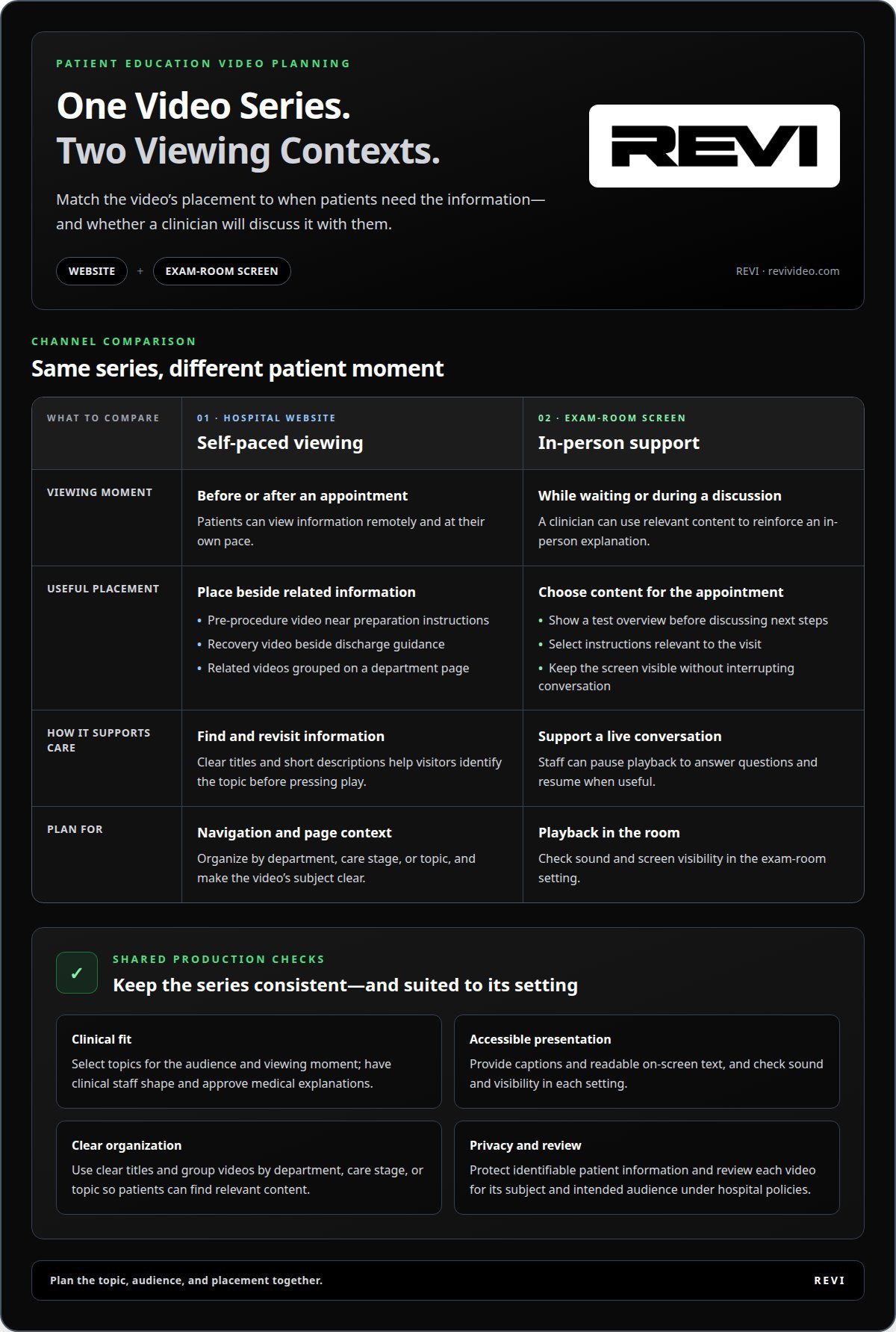
A hospital website lets patients view education before or after appointments. Place each video beside related service or visit information: a pre-procedure video near preparation instructions, for example, or a discharge topic alongside follow-up guidance. Clear titles help visitors find the right subject. Group videos by department, care stage, or topic, and add a short description so patients know what each covers before pressing play.
Exam-room screens serve a different moment. Patients can watch a relevant explanation while waiting or during a clinician-led discussion. Choose content suited to the appointment, such as an overview of a test or instructions for using a device. Keep the screen visible without interrupting conversation. Staff can pause playback to answer questions and resume when useful. A website supports self-paced viewing; an exam room supports immediate discussion.
For Chandler hospitals, practical platforms include hospital-managed websites and exam-room display screens. A website makes videos available for remote viewing, while an in-room screen presents selected content during care. Choose the channel based on when patients need the information and whether staff will discuss it with them.
To plan a series, start with the audience and viewing moment. Select topics, assign clinical reviewers, and plan versions for web pages and exam-room playback. Before launch, test navigation, captions, sound, and screen visibility in each setting. The hospital’s website team and clinical departments can coordinate placement and updates.
- Website example: Add a recovery video beside discharge guidance.
- Exam-room example: Show a test overview before discussing next steps.
- Series example: Group related videos under one department page.
Consistent production makes each format feel connected while fitting its setting. Plan patient education video production around the topics, audiences, and placements your hospital needs.
Which hospitals in Chandler offer patient education videos to patients?
Patient video access depends on each hospital’s education channels. A public video library, patient portal, and discharge materials may serve different needs. Look for a named hospital department or care topic, not just a general video page. For example, a cardiology video should appear with relevant heart-care information, helping patients judge whether it matches their visit.
In Chandler, Arizona, use the hospital’s official channels to find available education. Start with the facility website and search its patient education or department pages. Then review portal messages or visit instructions for video references. If the care team shares a video during an appointment, note its title and department. These steps help distinguish hospital-provided education from unrelated health content.
Check a video’s context before relying on it. A useful page identifies the hospital or department, states the topic, and explains who the content is for. Compare that information with the appointment, procedure, or care stage. A video about preparing for a test may help before a visit; a recovery explanation may fit after discharge. Department labels make the distinction easier to spot.
- Facility website: Search patient education and department pages.
- Patient portal: Review messages linked to care or appointments.
- Visit materials: Look for video titles in discharge instructions.
Hospitals and specialties may organize video access differently. One facility may group videos by department, while another may share them through visit materials. When browsing an official hospital page, search for the subject, such as “recovery,” “medication,” or “test preparation.” If a clinician recommends a video, use its title or department to find the matching resource and keep the search focused on relevant patient education.
For hospital teams, a clearly labeled video library makes content easier to find. Organize videos by department and care stage, then place each beside related instructions. Patients can move from a visit topic to its supporting explanation without sorting through unrelated material.
How can Chandler hospital patients access educational videos before or after a visit?
Before an appointment, start with the hospital’s official website. Search for the relevant department and visit topic, such as cardiology or test preparation. A patient portal message may also contain a video link. Use the title and department to confirm the video matches your upcoming care, then save the page or message for later.
During scheduling, note any video instructions shared by the care team. A patient preparing for a procedure, for example, can watch an introductory explanation beforehand. Write down questions that arise and bring them to the appointment. Advance viewing can support a focused conversation, but it does not replace discussing personal care with clinicians.
After a visit, look in the hospital’s portal, discharge materials, or department pages for relevant education. A recovery video can reinforce instructions after leaving the clinic. Match its topic to the care received and follow the specific guidance provided by the care team. If staff share a video title, search that exact wording on the hospital’s official channels.
Use this simple access sequence:
- Identify the hospital department or visit topic.
- Search the official website or patient portal.
- Open the matching video and note its title.
- Watch before the visit or revisit it afterward.
- Bring new questions to the next care conversation.
Caregivers can organize links by patient and topic. A folder labeled “appointment preparation” can hold pre-visit material, while one labeled “recovery” keeps follow-up education easy to find. Don’t rely on a title alone: confirm that the hospital and subject match. These small steps keep useful information accessible without mixing separate care instructions.
Hospitals planning video access can connect each topic to its patient journey. Create patient education videos that support clear access before and after visits.
REVI: Video Production
REVI’s Video Production service helps hospitals turn patient education concepts into planned video content. Start with department questions, define the intended audience, and map each episode to its viewing context. A series can organize topics by specialty, care stage, or patient question, with consistent titles and visual direction to keep the library cohesive.
Bring REVI in when your hospital is ready to develop educational videos or refresh how a series presents its topics. Website Development can support the digital home for the content, while Brand Building and design can create a consistent presentation. Start with your communication goals and the topics your clinical teams want to explain.
Contact REVI to discuss a patient education video project for your hospital.
Turn your education goals into a clear plan
Start by deciding what patients should understand and where the information should appear. A focused brief can connect each topic to its intended audience, clinical review process, and communication goals. This gives your team a practical starting point for a patient education video series for hospitals in Chandler, while recognizing that each department has distinct needs.
As you shape the plan, consider how each video fits the hospital’s broader digital presence. REVI offers video production, website development, and ad buying. A coordinated approach can align the content, its online home, and how people discover it. The right scope depends on your hospital’s priorities and existing resources.
Discuss your hospital’s video project with REVI and take the next step toward a clear, purposeful education plan. A thoughtful start can make your next production decision easier.
Frequently Asked Questions
What patient education video series are available for hospitals in Chandler, Arizona?
Available series depend on each Chandler hospital and its departments. There isn’t one shared catalog for every facility. Hospitals may organize education around specialties or patient needs, with some topics offered as individual videos rather than a full series. For a particular subject, use the hospital’s own patient education resources or ask the care team for the title of a relevant video.
What topics do hospital patient education video series cover?
Hospital series can cover medication routines, nutrition guidance, mobility exercises, and understanding test results. Divide each topic into focused episodes, such as one about following a medication schedule and another about preparing questions for a clinician. The hospital’s clinical team can shape the content to its audience, department, and patient education goals.