

An animated explainer video for a tech startup in Tempe can make a complex product easier to understand by showing the problem, how the technology works, and where it fits in a real workflow. Startup explainer videos are usually 30 to 90 seconds long, so each example can focus on one clear idea.
You know your product inside and out. Your audience may need a simpler path from “What does it do?” to “How would I use it?” A focused story makes that path easier to follow without burying the message in technical details.
Explore stories built around a problem and solution, a technology explanation, or a specific service use case. Animation can turn abstract features into clear visuals, connect product capabilities to everyday needs, and help each audience focus on what matters to them.
Key Takeaways
- Build each explainer around one audience problem, then show how the product resolves it.
- Use visual sequences to make the technology’s process and value easier to follow.
- Shape service examples around distinct customer needs instead of relying on a generic product demo.
- Assess whether an agency can connect the video’s story, design, and distribution to your startup’s goals.
How animated tech explainer videos communicate complex products
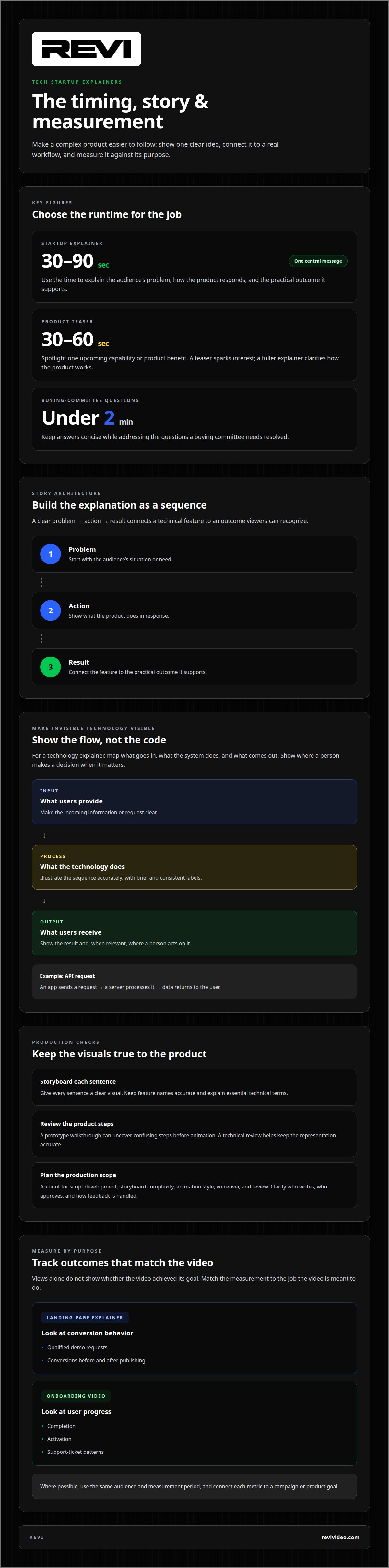
An animated explainer turns an abstract product into a sequence viewers can follow. For example, a cybersecurity startup can show a suspicious login, its detection, and the alert a customer receives. That problem-action-result structure connects a technical feature to a recognizable outcome. Startup explainer videos are usually 30 to 90 seconds long, so each needs one central message.
Start the script with the audience’s problem, then show how the product responds and what practical outcome it supports. Map each sentence to a clear storyboard visual, such as data moving between a user dashboard and a cloud service. Keep feature names accurate, explain essential technical terms, and end with one next step, such as booking a demo.
A product feature overview can group capabilities by task instead of presenting a flat list. Imagine a project-management platform: animate a task moving from intake to assignment to completion. A product teaser, typically 30-60 seconds, can spotlight one upcoming capability or product benefit. Use the teaser to spark interest; use a fuller explainer to clarify how the product works.
Production planning depends on the work involved, including script development, storyboard complexity, animation style, voiceover, and review. Clarify who writes the script, who approves each stage, and how feedback is incorporated. A prototype walkthrough can help reveal confusing product steps before animation begins, while a technical review keeps the product representation accurate.
Set out usage rights, music licensing, and revision terms in the production agreement. Specify where your startup can use the finished video, who handles music permissions, and which deliverables and edits are included in the agreed scope. Clarify whether revisions cover the script, storyboard, or completed animation. Written terms help prevent misunderstandings during approval.
Measure ROI against the video’s purpose, not views alone. For a landing-page explainer, track qualified demo requests and conversions before and after publishing. For an onboarding video, compare completion, activation, and support-ticket patterns. Where possible, use the same audience and measurement period, and connect each metric to a campaign or product goal. This makes the results more actionable.
Technology explainers
A technology explainer makes an invisible process visible. For a Tempe startup describing an API, for example, animation can show an app sending a request, a server processing it, and data returning to the user. Viewers see the sequence without needing to inspect code. Startup explainer videos usually run 30 to 90 seconds, while buying-committee questions should be answered in under two minutes.
Choose a story based on what the audience needs to understand. A machine-learning platform, for example, might need to show how incoming data becomes a useful prediction. Illustrate the input, the model’s analysis, and the output, then show where a person makes a decision. This gives technical stakeholders a process to assess and business audiences a reason to care.
Make every visual serve the explanation. A cloud architecture video could label the customer interface, processing layer, and storage. Animate a request moving through those components, then highlight where an integration fits. Keep labels brief and consistent with product terminology. If a component is proprietary, describe its role accurately without implying that the animation reveals its internal code.
Consider a hypothetical startup selling sensor analytics to building managers. The problem is scattered readings across separate systems. The animation shows sensors sending information to a dashboard, where a manager spots an unusual pattern and takes action. This is a clear use case, not a claim that the software guarantees savings or prevents failures. Specific examples clarify the product’s boundaries as well as its benefits.
Before production, sort facts into three groups: what users provide, what the technology does, and what users receive. A product lead can review those steps against the interface, while a technical reviewer checks terminology. Then test the storyboard with someone outside the engineering team. If they can explain the process in their own words, the visuals are doing useful work. A focused technology explainer plan can help turn that complexity into a crisp story.
Using 2D animation to present a service and its use cases
2D animation suits services built around steps, decisions, or data flows. Flat shapes, labels, and motion can show how a user moves through a process without staging a live demonstration. The best style depends on the product: a dashboard service may need crisp interface graphics, while a delivery platform may benefit from animated maps and route lines. Choose horizontal, vertical, or square framing based on where viewers will encounter the video.
Consider a SaaS invoicing platform for independent consultants. A consultant tracks payments across separate tools. The animation follows an invoice from creation to payment status, then shows the dashboard’s role. This focused use case explains the service through one customer workflow rather than listing every feature. Keep each screen consistent with the actual product interface.
Another scenario: a logistics startup helps retailers coordinate deliveries. Show a store preparing an order, a dispatcher assigning a driver, and a customer receiving a status update. The sequence clarifies who uses the service and when. Avoid suggesting every delivery follows the same path; show a workflow the product actually supports. One specific scenario gives viewers a concrete way to picture the service in their own operations.
Create separate versions when audiences face different problems. A retailer may care about order visibility, while a dispatcher needs a clearer assignment process. Give each version its own situation, action, and result. This keeps the message relevant without cramming unrelated use cases into one video. A broad demo can explain the product, while targeted stories make a specific customer need easier to recognize.
For SaaS companies, use-case videos often achieve higher conversion rates than generic product demos because they address pain points relevant to specific viewer segments. That makes audience focus a strategic choice, not just a writing preference. Test a story about one real workflow, then assess whether it supports the intended conversion goal. Keep the animation style, narration, and ending aligned with that audience and use case.
What Tempe agencies produce animated explainer videos for tech startups?
Tempe agencies that produce animated explainers can bring together scripting, storyboarding, illustration, animation, narration, and editing. An animated explainer video for a tech startup in Tempe should connect accurate product details with a clear audience and purpose. A team familiar with software workflows can make features easier to follow without overstating what the product does.
Picture a Tempe startup launching a scheduling platform for clinics. The product page lists features, but visitors cannot picture the booking workflow. A production team can build a story around a clinic coordinator scheduling an appointment, then animate the key steps. The finished video gives viewers a practical example to follow.
A video project can move through discovery, script, storyboard, design, animation, and review. Product and marketing leads can check accuracy and message alignment at each stage. For an animated explainer video for a tech startup in Tempe, a technical review before animation can catch interface or terminology issues early, before they affect completed scenes.
Consider a cybersecurity startup preparing to launch to IT teams and business leaders. A team can develop a central story, then adapt examples to each group’s concerns. This keeps the core message consistent while making each version more relevant to its viewers.
To start, define the audience, the product detail viewers need to understand, and where the video will appear. A concise brief helps guide the script and visual direction. Plan an animated explainer around the product’s clearest use case.
That format can also support onboarding and customer education when a product has steps that are easier to see than describe. A 2021 survey reported that 83% of consumers prefer watching training videos to reading training manuals or product documentation or listening to audio formats. For a startup, this is a reason to consider whether an explainer could serve beyond launch messaging, such as helping a prospective user understand a workflow before requesting a demo. The video should make clear what it covers and what it leaves out, so viewers are not led to assume a feature exists when it does not.
Consider whether the video needs captions, voiceover, or visual labels to make the explanation easier to follow. Tie each element to the central use case, and check that the final cut accurately reflects the product and its current capabilities.
REVI: Video Production
REVI helps tech startups turn complex products into animated stories through its video production services. Bring the team in when your audience needs to understand a service, workflow, or product feature clearly. A focused project connects the core message, visuals, and intended viewer without crowding the video with every capability.
Share the product details, target audience, and goal for the video. REVI can shape those inputs into a clear creative direction. If the explainer is part of a broader launch, Ad buying, Website Development, or Brand Building can support related marketing needs.
Ready to make your product easier to understand? Contact REVI to discuss your explainer video.
Give your product story room to grow
Your product will evolve, and its story should evolve with it. As features shift, audiences change, or a launch moves from awareness to onboarding, revisit the central message. An animated explainer video for a tech startup in Tempe can provide a focused starting point, with future edits reflecting new priorities while preserving the product’s core identity.
Before production begins, decide what viewers should understand, feel, or do after watching. That gives your creative team a useful filter for every script line, visual, and placement. Keep the story grounded in the product, then let each version serve a distinct moment in the customer journey. Clear intent makes the finished video easier to use consistently across your marketing.
Consider how your roadmap may change what audiences need to know. A new feature may call for an updated explanation, while a broader launch may need a sharper introduction. Planning for that evolution helps preserve a recognizable voice as your message develops. Keep the core promise steady, and adjust the details when the audience or product context changes.
Ready to turn your product narrative into a video plan? Discuss your video with REVI. Your next clear story starts with one focused decision.
Frequently Asked Questions
How long does it take to produce an animated explainer video in Tempe?
Production planning depends on project scope, animation complexity, and approval pace. A focused product walkthrough differs from a video covering several use cases or custom motion graphics. Before kickoff, gather interface captures, accurate feature details, and brand assets, then plan reviews for the script, storyboard, and edit. For a Tempe startup coordinating a launch, align approvals with the release calendar.