

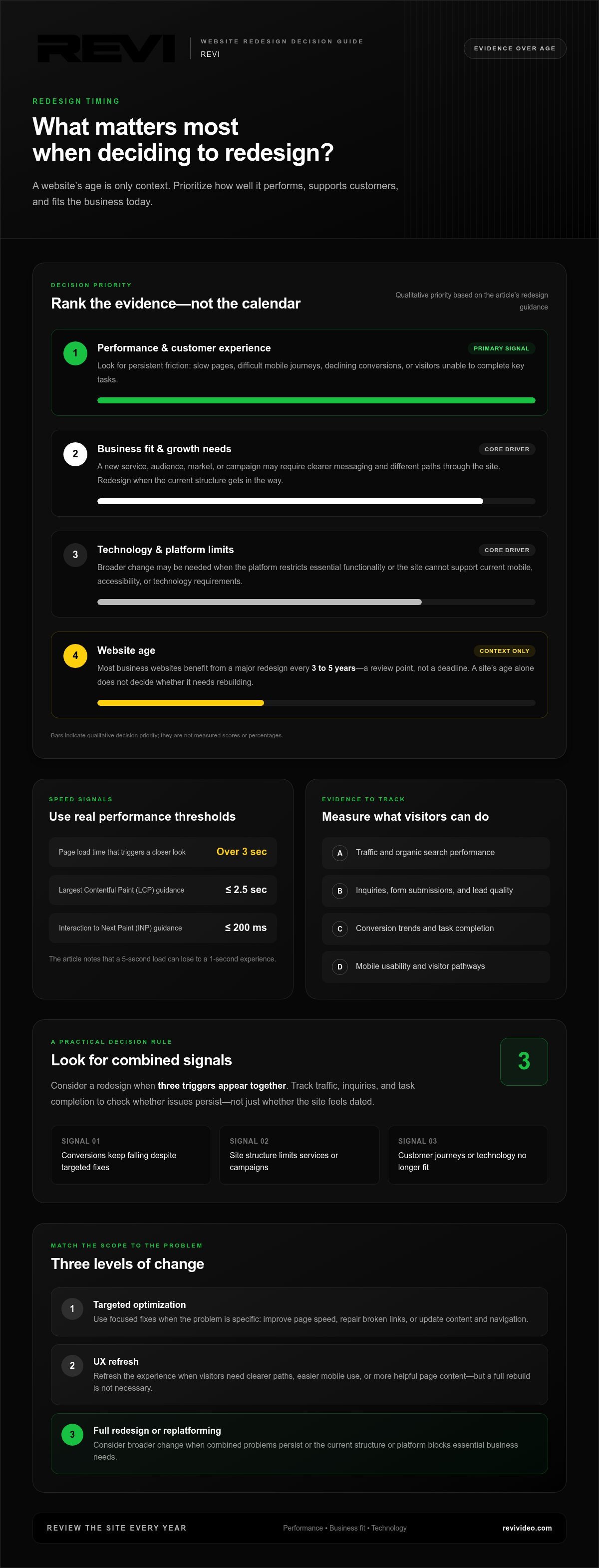
A website’s age alone doesn’t tell you it’s time for a redesign. Most business websites benefit from a major redesign every 3 to 5 years, but performance and changing business needs matter more than the calendar. If you’re weighing when it’s time to redesign your company website, evaluate it every year and look for signs that it no longer serves your customers or supports your goals.
It’s frustrating when a site looks dated or feels clunky, but a full rebuild isn’t always the answer. Targeted optimization or a UX refresh may solve the problem with less disruption.
This guide shows you how to assess speed, mobile usability, conversions, and search performance, then choose the right scope of change. Learn to spot when a few focused improvements will do, when a broader experience refresh makes sense, and when it’s time for a full redesign, so your next step is based on evidence rather than guesswork.
Key Takeaways
- Review your site regularly between major redesigns: improve page speed, repair broken links, and keep content current.
- Base a redesign decision on performance, business goals, and technical limits, not the website’s age alone.
- Use conversion, bounce-rate, mobile, and search metrics to identify where visitors are getting stuck.
- Match the fix to the problem: optimize specific issues, refresh the user experience, or consider replatforming when the current system holds you back.
- Set a review rhythm that helps you catch problems early and decide whether a full redesign is truly needed.
How Often Should You Update Your Website?
Update your website regularly between full redesigns. Use an annual review to catch speed, content, and usability issues before they disrupt customer journeys.
Speed, Navigation, and Mobile Usability
Site speed, clear navigation, and mobile usability determine how smoothly visitors reach useful information. A page taking over 3 seconds to load is a performance trigger, while a 5-second load can lose to a 1-second experience. Google’s web.dev guidance identifies a Largest Contentful Paint (LCP) of 2.5 seconds or less and an Interaction to Next Paint (INP) of 200 milliseconds or less as strong performance.
Test key pages on a phone and desktop, including the home page, service pages, and contact form. Tap each navigation item and check whether visitors can find essential details without backtracking. Since most internet users browse on mobile devices, menus, buttons, and forms need to work on smaller screens. During routine maintenance, also review page performance and check for broken links.
Broken links can strand visitors on missing pages. Check internal links after changing a page address, removing a service, or publishing an article. Replace outdated destinations, then confirm that important pages remain connected through relevant navigation and internal links. For example, a visitor reading a marketing article about a service should have a working path to that service page.
Keep content aligned with your audience and current business priorities. Refresh service details, imagery, project examples, and calls to action when they no longer reflect what the business provides. Review content against customer questions and changing market trends; a page written 3 years ago may still be useful, but its facts, links, and examples need a fresh look.
SEO and Traffic Preservation
Preserving SEO and traffic means protecting useful pages, search signals, and visitor pathways during updates or a redesign. To reduce the risk of losing rankings, map existing page addresses, retain valuable content, and redirect changed URLs to their closest relevant replacements. After launch, check indexing and traffic. Missing pages and broken internal links can interrupt discovery.
Keep each page’s purpose clear as you revise it. If an established page answers a specific audience question, preserve its subject and improve the copy rather than replacing it with unrelated content. Make sure internal links point to live pages and search engines can access important content. When a page moves, update links across the site instead of relying on redirects alone.
- Test load speed on core pages, then prioritize pages exceeding 3 seconds.
- Check mobile menus, forms, and navigation on a real phone.
- Repair broken links and review page content during regular maintenance.
- After a redesign, compare indexing and organic traffic with the previous site.
How Often Should I Redesign My Business Website?
Most business websites benefit from a major redesign every 3 to 5 years. Treat that as a review point, not a deadline: performance, business goals, and technology should guide the decision.
The practical answer to when is it time to redesign your company website is whether the site still works for your customers and your business.
Performance and Business Redesign Triggers
Performance and business triggers are recurring signs that a site is getting in visitors’ way or limiting growth. Consider broader changes when conversions keep falling despite targeted fixes, or when the site structure limits new services or marketing campaigns. A useful framework is to consider redesigning when three triggers appear together. Track traffic, inquiries, and task completion to see whether the problems persist.
Set specific business goals before changing the site, then measure results against them. If you want more qualified inquiries, compare relevant form submissions and lead quality before and after launch. If your goal is audience growth, monitor organic traffic and the pages visitors use. A visual refresh alone doesn’t prove success: connect each change to a measurable customer action.
Business Changes and Website Fit
Business changes can make a website outdated when its content, structure, or platform no longer reflects what the company does. Adding a service, changing your audience, or entering a new market may call for different page paths and clearer messaging. If visitors can’t find current offerings or understand what to do next, the site no longer fits the business.
Review the site after major changes to products, positioning, or customer needs. Check that service pages match current priorities and that navigation supports the most important journeys. For businesses reassessing their brand positioning, consulting an outsourced marketing specialist like Marketing Angels can help clarify core messaging before changing site architecture. A website built two years ago may still need redesigning if its structure limits growth. Conversely, a 10-year-old website can outperform competitors when it still supports users and business goals.
Redesign Timing
Redesign timing comes down to when a website’s limitations justify broader changes instead of another isolated fix. Evaluate the site every year, then weigh its performance, customer experience, and technical requirements. A business website that is three years old may not suit current mobile devices, accessibility practices, or web technologies.
Age alone isn’t a trigger. A site built three years ago may need only focused updates, while a newer site may require a redesign if its platform restricts essential functionality. Flash is no longer supported, so sites that rely on it need newer technology. Consider the combined evidence, not the calendar in isolation.
Redesign Costs and Risks
Redesign costs depend on the project’s scope, complexity, platform, and business needs. The price depends on the case and is given after a quote request. Risks include losing search visibility, disrupting traffic, breaking existing page paths, and removing content that visitors rely on.
Reduce disruption by documenting valuable pages and current performance before work begins. Plan how changed page addresses will connect to relevant replacements, then test important journeys before launch. Compare results with the goals set beforehand. A website structure and design review can help clarify which changes support those goals.
Conversion, bounce-rate, mobile, and SEO metrics
Website metrics show where visitors disengage and whether the problem calls for a focused fix or a broader redesign. Review conversion, bounce, mobile, and search signals together before changing the experience.
Conversion, Bounce, and SEO Metrics
Conversion, bounce, and SEO metrics connect visitor behavior with business results. A conversion rate below 2% or bounce rate above 70% can signal friction, but neither number proves a redesign is the answer. Compare results across landing pages and traffic sources. A mismatch between mobile traffic above 60% and mobile conversions under 1% points toward a mobile experience issue.
Look for patterns over time. SEO traffic declining for more than 3 months deserves investigation; search rankings declining for 6 months or more may also indicate a redesign trigger. Check for changes in messaging, page relevance, and navigation before attributing a drop to visual design. If conversion rates sit 50% below the industry standard, review the visitor journey and the offer’s clarity.
Google’s web.dev guidance identifies an LCP of 2.5 seconds or less, an INP of 200 milliseconds or less, and a CLS score of 0.1 or less as strong performance. These measures help distinguish slow loading, delayed interaction, and unstable layouts. Track them alongside conversions, not as isolated technical scores.
Mobile Usability and Compatibility
Mobile usability and compatibility mean that pages, controls, and navigation work across phone screens and browsers. Since most internet users browse on mobile devices, a desktop-first design can get in the way of important actions. Test service pages, menus, forms, and calls to action on different screen sizes and browsers.
Test each mobile task from start to finish. Open the menu, find a service, submit a form, and confirm the next step appears. If a menu covers the page or a form button requires awkward scrolling, visitors may leave before converting. Design trends can inspire visual updates, but clear navigation and readable content matter more.
Mobile responsiveness should evolve with customer behavior and business goals. Compare mobile and desktop conversion paths, then identify where steps differ. If mobile traffic exceeds 60% but mobile conversions remain under 1%, examine tap targets, form fields, and page layout. Test key pages in common browsers so a fix on one screen doesn’t create a new barrier elsewhere.
Use the evidence to choose the scope of change. A single weak landing page may need sharper messaging or a clearer call to action. A site-wide pattern across mobile navigation, conversions, and search visibility points to a deeper design problem. Record the affected pages and metrics, then compare them after changes launch.
Optimization versus a UX refresh or replatforming
Choose the scale of change by matching each website problem to its cause. A slow service page, confusing navigation, and an inflexible platform each call for different fixes.
Optimization targets a specific issue while keeping the existing structure. If one landing page loads slowly or visitors abandon a form, improve that page, simplify its fields, or clarify its call to action. This approach fits when the problem has a clear location and cause. It avoids rebuilding sections that already support the user experience and business goals.
A UX refresh updates the experience across key pages without replacing the entire site. It can include new visuals, updated copy, better imagery, improved layouts, and minor usability changes. For example, a service page may need clearer headings and a more visible next step. A refresh makes sense when the site’s core structure and functionality work, but its presentation or flow needs attention.
A full redesign changes the site’s structure or core experience. It may involve new branding, a complete restructure, a new CMS or platform, an SEO overhaul, new functionality, or mobile-first redevelopment. Consider this scope when several page types create friction, the current design no longer fits the brand, or the system blocks essential features. A complete rebuild goes beyond a visual update.
- Optimize when one measurable issue affects a specific page or task.
- Refresh when the layout, imagery, or copy needs improvement, but the foundation still works.
- Redesign when structure, branding, and user experience need coordinated changes.
- Replatform when the current system limits required functionality or future growth.
Replatforming focuses on the system underneath the website, not just its appearance. A business may need a different CMS when its current platform makes routine content updates difficult or can’t support required functionality. For online stores planning a migration or upgrade, partnering with specialist agencies like nbedesign.com can help align platform capabilities with long-term commercial goals. But switching platforms alone won’t fix unclear messaging or confusing navigation. Identify the technical constraint first, then separate it from design and content problems.
Match every proposed change to a user or business need. List the affected pages, the task visitors struggle to complete, and the improvement you expect. For example, if customers can’t find a service, test the navigation and page structure before replacing the CMS. If the platform prevents a necessary feature, assess replatforming alongside the design scope.
Keep what works. A focused update can preserve effective pages while improving a specific experience. Choose a refresh when several connected pages need a more consistent flow. Consider a full redesign when limitations span the site’s structure, functionality, and brand expression. Let the evidence, not the appeal of a fresh look, determine the scope.
Recommended website redesign frequency
Most business websites benefit from a major redesign every 3 to 5 years, but that interval is a review point, not an automatic rebuild date. Performance, audience needs, business goals, and technical requirements should decide whether the site still works.
Before redesigning, document current goals, traffic, conversions, and search visibility. Identify the pages and user tasks that need improvement, protect valuable content, and define how you’ll measure success after launch.
Use an annual website review to spot changes between redesigns. Check whether the platform supports current functionality, the site reflects the business, and customers can complete key tasks. A company adding services, changing its audience, or updating its positioning may need changes sooner than its original schedule suggests.
Age provides context, not a verdict. A site built two years ago may need rebuilding if its structure limits growth. Some 10-year-old websites still outperform competitors because they meet user needs and support business goals. A larger website may extend its redesign interval to 4 or 5 years when its performance and technology remain effective.
Build a review rhythm around the scale of the site. Enterprise teams can run a structured website review or UX audit every 6-12 months. Other businesses should evaluate their websites every year, then investigate issues as they appear. This keeps strategic decisions tied to actual performance, rather than design trends or a fixed calendar.
Before committing to a rebuild, work through these checks:
- Compare current traffic, conversions, and search visibility with business goals.
- Identify which pages, tasks, or technical requirements no longer work.
- Separate problems that need targeted updates from those requiring structural change.
- Preserve useful content and page paths when planning a new site.
- Set success measures before launch, then review the results afterward.
These steps keep a redesign focused. A business may find that its platform blocks a needed feature, while its existing content and page structure still work well. That points to a technical change, not necessarily a complete visual rebuild. If problems span navigation, branding, and functionality, broader redesign work may make more sense.
Turn your annual review into a clear plan for website development and design when evidence shows the current experience needs broader change.
REVI: Ad buying
REVI helps businesses connect website decisions with ad buying when they’re ready to bring qualified visitors to a clear, useful online experience. Ads can direct people to landing pages, so align each campaign’s message with the page offer and next step. If you’re redesigning, coordinate campaign timing with the launch and review destination pages before sending traffic.
For broader updates, REVI also provides Website Development, Design, Video Production, and Brand Building. These services can support a consistent experience across your site and marketing creative. Ad buying is most relevant when your website clearly explains what you offer and guides visitors toward action. If the site still has major usability or technical barriers, address those first so your campaigns lead to a functional destination.
To discuss your website and advertising goals, contact REVI.
Make Your Next Website Move With Purpose
Your website should grow with your business, not just keep up with its launch. The answer to when it is time to redesign your company website comes from watching how visitors use it and deciding what should work better. That decision can shape more than the site itself. It can clarify your message, sharpen the customer experience, and give future marketing a stronger destination.
Before committing to a direction, define the change you want customers to notice. They may need to understand your offer faster, find the right page more easily, or take a clearer next step. Keep that outcome at the center of the project. A purposeful update gives your team a practical standard for design and development decisions.
REVI offers Website Development, Video Production, and Ad buying to support businesses building a clearer digital presence. If you’re ready to discuss your website’s next step, contact REVI about your website. Start with the goal, then move forward with confidence.
Frequently Asked Questions
Redesign vs Refresh: What’s the Difference?
A refresh improves parts of an existing site, while a redesign changes its broader experience or structure. Updating service-page copy and imagery, for example, can refresh a site that still supports customer journeys. If customers need new page pathways, functionality, and a different brand expression, a redesign may fit better. Consider whether the current foundation can support the experience your business needs next.
What Are the Signs That It Might Be Time for a Redesign?
Consider a redesign when the site repeatedly prevents visitors from understanding your offer or completing important tasks. For example, if customers mention confusing service information and analytics show people leaving those pages, the issue may involve both content and structure. A new visual style alone won’t solve unclear messaging. Compare user feedback with page behavior to see whether the problem affects one page or the wider site.
What are the signs a company website needs a redesign?
A company website may need broader changes when its content no longer reflects its services, its structure can’t support growth, or essential features don’t work reliably. Watch for staff having to direct customers around the site, outdated service pages, or forms that fail during routine use. For businesses serving Phoenix, Scottsdale, Gilbert, Mesa, Chandler, Paradise Valley, or Tempe, make sure visitors can quickly find information relevant to their needs.
How often should a business website be redesigned?
Most business websites benefit from a major redesign every 3 to 5 years, but there’s no fixed deadline. Evaluate the site every year and use performance, user needs, and technical requirements to guide the decision. A business that changes its services or audience may need a redesign sooner. A site that still supports customers and goals may remain effective longer, even if its design isn’t new.
How do you measure whether a website redesign is needed?
Measure the need for change against defined business goals. Review key actions such as completed inquiries, product-page visits, and successful form submissions, then examine which pages help or hinder them. Combine analytics with direct observation, such as whether a customer can find a specific service without assistance. If several measures point to the same site-wide barrier, broader changes may be justified.
How do outdated design and poor mobile usability affect conversions and SEO?
Outdated design can weaken trust, while poor mobile usability can make visitors abandon tasks before converting. Mobile problems include cramped text, hard-to-tap buttons, and forms that require awkward scrolling. Search visibility can also suffer when a site loads slowly or provides a weak mobile experience. Test key customer tasks on a phone, then compare completion with desktop journeys to find specific friction.
What website performance benchmarks indicate a redesign is needed?
A page loading in over 3 seconds is a performance trigger to investigate, but it doesn’t automatically call for a full redesign. Google’s web.dev guidance identifies LCP of 2.5 seconds or less, INP of 200 milliseconds or less, and CLS of 0.1 or less as strong performance. If pages miss those benchmarks alongside broader usability issues, assess whether the causes require structural changes.
Website redesign vs refresh: which is right for a business?
Choose a refresh when the site’s foundation works and targeted changes can improve the experience. Choose a redesign when problems span structure, branding, navigation, or functionality. For instance, a business with strong service pages but inconsistent imagery may need a focused refresh. If a platform prevents the business from adding essential features, consider replatforming as part of a wider redesign. Match the scope to the underlying problem.